About Ring Escape
Create space first
Gold pins stay fixed in the field. A ring cannot turn through them. Reposition the connected assembly first to clear the blocked opening.
Keys and latches
A gold latch closes a ring opening. The smaller numbers below its ring number identify the key rings. Release these first; two numbers require both keys. The closed, welded eyelets always stay on their carrier.
50 levels with more to work out
Two introductory puzzles explain the rings. Stop pins follow, then keyed latches and combinations of up to three pins and three latches. Ring gaps become narrower. Hints, Undo and Replay help you experiment.
Rules and controls
Free the whole arrangement
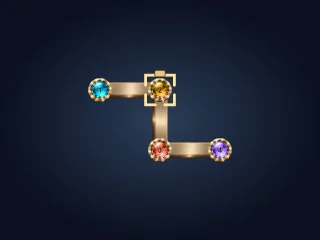
Every eyelet is a closed frame welded to its carrier ring. Only the threaded ring can turn its own gap out of that eyelet. Turning carries the welded eyelets and rings still threaded through them. Detached rings stay in place. A fully freed ring flies out with all its welded eyelets.
Gold pins stay fixed and stop the whole rotation. Reposition an assembly to create space. Gold latches close a ring gap until all key rings listed below its number are released. The eyelets themselves always remain closed and welded in place.
Turn with your finger
Tap a ring and drag around its centre, or use the gold rotation buttons. A short tap turns 15°. Hold to keep turning smoothly until you release, the ring is freed or a pin blocks it. Release snaps to 15° steps. Rejected turns do not count. Keyboard: Tab selects a ring, Left/Right turns it, Shift turns 45°.
Hints, undo and completion
Hint makes the useful ring blink. A brief message below the controls gives its direction and angle. Sometimes a group must move to create space first; the hint may recommend Undo. Undo restores rings, links and latches and counts as another turn. Completion offers Next and Replay.
Settings and saving
Choose one of 50 levels, show the active timer or reduce movement. Tap Level at the top left to cycle directly, wrapping from 50 to 1. Only settings are stored on this device; account saves and rankings are not enabled.
Display and sound
Show the active timer, reduce movement or adjust the sound switch and volume.
Only settings are saved on this device. Account saves and rankings are not enabled.